

Learn how to sell to Best Buy, from vendor requirements to EDI compliance. Understand approval steps, validation, testing, and how to streamline integration.
Selling to Best Buy starts with submitting a Merchandising Inquiry and earning approval. From there, vendors must meet strict guidelines for Best Buy's Partner Portal and achieve production-ready electronic data interchange (EDI) status before a single purchase order is issued or fulfilled.
If you're serious about learning how to sell to Best Buy, you’ll need more than a strong product line. You’ll need operational readiness across documentation, fulfillment workflows, and system connectivity. Even minor compliance gaps can delay onboarding or stall shipments. A modern API-driven EDI platform can turn those issues around. This guide walks through the critical approval steps, operational expectations, and technical requirements that determine whether your brand gets to go live and shows how a modern EDI solution can help achieve your business goals.
About Orderful
Orderful's Mosaic platform accelerates Best Buy EDI compliance through automated testing and validation before documents reach production. The API-driven system enforces Best Buy-specific requirements for purchase orders, acknowledgments, advance ship notices, and invoices, reducing errors that trigger failed test cycles. Real-time visibility into document status helps vendors maintain control over onboarding timelines, while automated mapping eliminates the formatting inconsistencies and data structure issues that commonly delay certification and stall launch dates.
Selecting Your Best Buy Selling Channel
Before you complete onboarding, you’ll need to determine how your products will move through Best Buy’s retail ecosystem. Your selling channel affects everything from inventory ownership to shipping workflows and EDI document requirements. Best Buy offers multiple fulfillment models, and each one carries different operational responsibilities for suppliers and vendors.
Understanding these differences early helps you align with Best Buy vendor requirements and avoid delays during setup and compliance testing.
Retail Model Comparison
Requirement | Core Retail (Domestic) | Supplier Direct Fulfillment (SDF) |
|---|---|---|
Inventory ownership | Best Buy purchases and stocks goods in its distribution centers (DDCs). | You retain inventory and ship directly to the end customer. |
Shipping method | Ship bulk orders to Best Buy warehouses. | Ship individual customer orders using Best Buy’s UPS account. |
EDI documents required | Standard retail documents (850, 855, 856, 810). | Retail documents plus direct-to-consumer shipping compliance. |
Receiving process | Warehouse-based receiving and POS replenishment. | Order-by-order fulfillment with strict timing requirements. |
Under the Core Retail model, Best Buy acts as the buyer of record and manages downstream distribution. This approach works well for brands that can meet bulk shipment expectations and warehouse labeling standards.
With Best Buy Supplier Direct Fulfillment (SDF), you operate more like a fulfillment partner. Orders flow directly to your system, and you’re responsible for fast, accurate shipments that meet Best Buy’s fulfillment and labeling standards.
Best Buy also operates a selective Marketplace model for established brands, but most first-time vendors will enter through Core or SDF, depending on their supply chain capabilities.
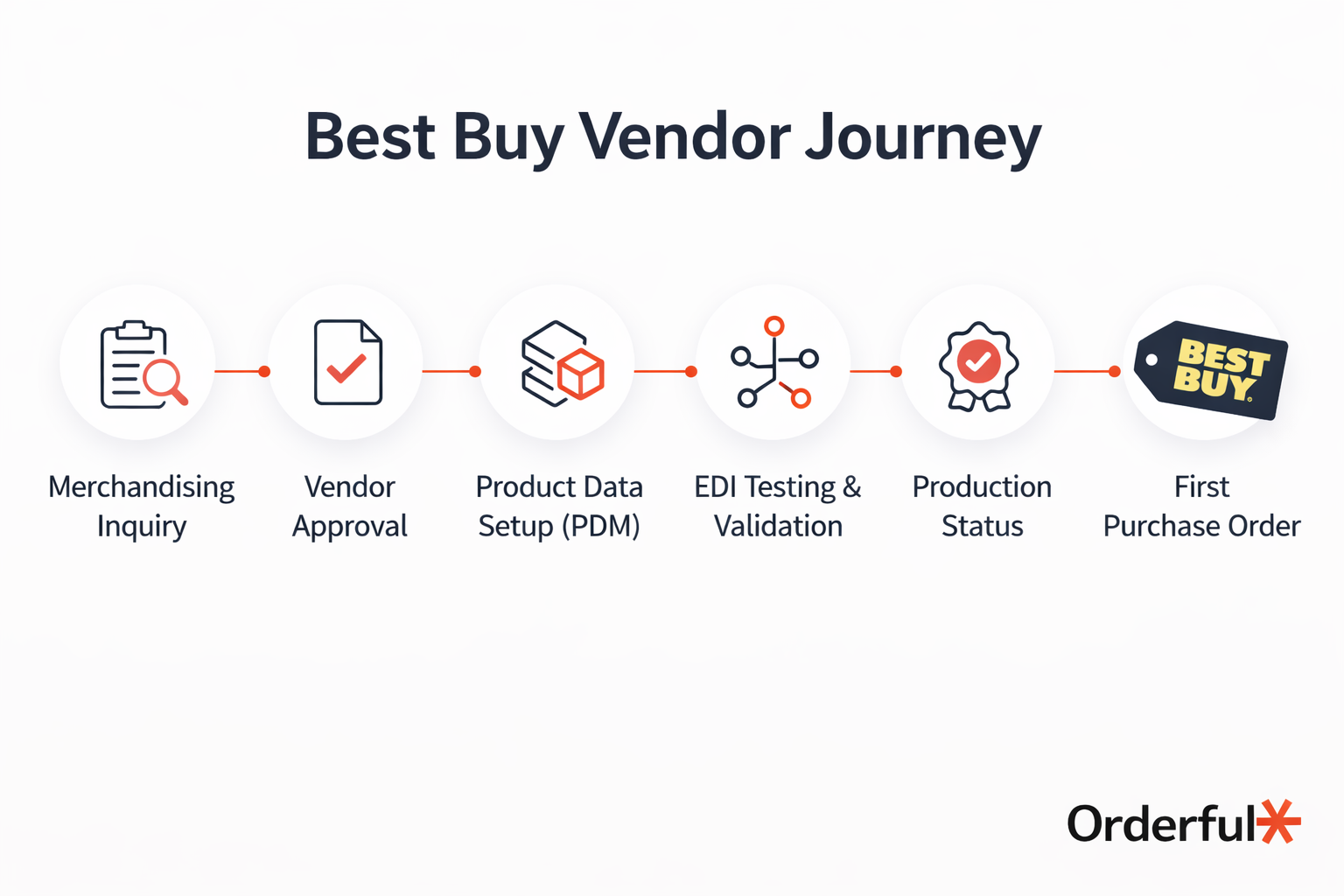
Best Buy Vendor Requirements and Compliance Basics
Before Best Buy approves your company as an active vendor, you’ll need to clear several foundational requirements. Meeting the retailer's precise EDI standards ensures your business is properly registered, financially accountable, and operationally prepared to move merchandise through Best Buy’s supply chain without disruption.
Business Registration and Tax Documentation
Vendors must provide appropriate tax forms, such as a W9 or W8-BEN, along with a valid Dun & Bradstreet (D&B) number. Best Buy also requires a Global Location Number (GLN) to uniquely identify your business within its systems and across trading partner communications.
Insurance Coverage Thresholds
Best Buy requires commercial general liability insurance, with coverage typically ranging from $2 million to $10 million, depending on the product category. Proof of insurance must meet Best Buy’s stated guidelines before onboarding can move forward.
Product Data and SKU Setup
Vendors must enter all merchandise into Best Buy’s Product Data Management (PDM) system for review and acceptance. Accurate GTIN alignment, SKU attributes, and barcode standards are essential to avoid delays during item setup and warehouse receiving.
Meeting these Best Buy vendor requirements early reduces friction during onboarding and positions your company for smoother Best Buy EDI compliance and integration.
The Technical Hurdle: Best Buy EDI Compliance
For most brands, Best Buy EDI compliance is the point where strategy turns into execution. Before you can receive live orders, your EDI system must pass testing and reach production-ready status within Best Buy’s certification process. If documents fail validation or formatting standards, your launch timeline can stall, setting back critical business and operational goals.
Best Buy requires vendors to exchange specific EDI documents accurately and consistently. These transactions drive the purchasing, shipping, receiving, and payment workflows across its supply chain.
Required EDI Documents for Best Buy Vendors
850 Purchase Order (PO): The 850 initiates the transaction. Best Buy sends this document to place an order for your products, and it must be transmitted and processed without formatting errors.
855 Purchase Order Acknowledgment: Vendors must return an 855 to confirm acceptance, rejection, or modification of the order. This response tells Best Buy whether you can fulfill the requested quantities and ship dates.
856 Advance Ship Notice (ASN): The 856 communicates shipment details before goods arrive at the warehouse or customer location. It must include accurate carton-level data and SSCC-18 barcode information to support scanning and receiving.
810 Invoice: The 810 triggers electronic payment. Invoice discrepancies can delay payment or create reconciliation issues that require manual review.
Achieving Production-Ready EDI Status
Achieving certification requires successful document testing, accurate data mapping, and strict adherence to Best Buy’s EDI guidelines. Even small syntax or structural errors in any EDI document can result in failed test cycles.
During the testing phase, Best Buy evaluates whether your EDI documents conform to its specific transaction guidelines and data structure requirements. Each document must pass validation for required segments, standardized formats such as ANSI X12, and accurate item-level data. Failed test cycles often require re-mapping, correction, and resubmission, which can extend onboarding timelines by weeks if not managed efficiently.
This is where many companies encounter preventable delays. Manual mapping processes, inconsistent data formatting, or legacy VAN-based workflows can introduce errors that trigger compliance flags or costly chargebacks under Best Buy’s “Ship It Right” program.
A modern, API-driven EDI platform like Orderful's Mosaic helps vendors test and validate transactions before they reach production. By automating mapping, enforcing Best Buy–specific requirements, and providing real-time visibility into document status, Mosaic reduces errors and accelerates Best Buy EDI integration without adding operational complexity.
Navigating the Best Buy Onboarding Timeline
Even after receiving preliminary approval, onboarding as a Best Buy vendor requires coordination across merchandising, operations, and technical teams. Timelines can vary depending on your selling channel and the readiness of your internal team. Vendors entering through Core Retail typically move faster than those implementing Best Buy Supplier Direct Fulfillment, where UPS account provisioning and direct-to-consumer (DTC) workflows add complexity.
EDI testing is often the most critical variable in the process. Launch dates may face weeks of delay if certification cycles stall or documents fail validation. Companies that underestimate mapping accuracy, document sequencing, or required data elements can find themselves repeating test rounds while inventory sits ready but inactive.
Common Reasons EDI Testing Fails
Incorrect data mapping: Required segments or item-level fields may not align with Best Buy’s specifications.
Inconsistent document structure: Variations in formatting can trigger validation errors during certification.
Missing shipment details: Incomplete carton-level data or barcode information can cause ASN failures.
Delayed acknowledgment responses: Failure to return required confirmations within expected timeframes can halt progress.
Proactively managing these risks helps you maintain control over your onboarding timeline and reach production faster.
Streamline Your Best Buy EDI Integration
Learning how to sell to Best Buy means more than securing approval. It requires disciplined execution across vendor requirements, EDI compliance, and operational readiness. When your systems consistently meet Best Buy’s standards, purchase orders move faster, shipments process accurately, and payments flow without unnecessary delays.
An API-driven platform like Orderful’s Mosaic gives your team the visibility and control needed to meet Best Buy EDI requirements with confidence. If you’re preparing to onboard or looking to stabilize your integration, now is the time to act.
Speak with an EDI expert to discuss your Best Buy integration strategy, or book a demo today to see how Mosaic streamlines compliance from day one.
Selling to Best Buy FAQ
What are Best Buy's vendor requirements?
Best Buy vendors must provide tax forms (W9 or W8-BEN), a valid Dun & Bradstreet number, and a Global Location Number (GLN) for business identification. Commercial general liability insurance coverage of $2-10 million is required depending on product category. All products must be entered into Best Buy's Product Data Management system with accurate GTIN alignment, SKU attributes, and barcode standards before onboarding can proceed.
What selling channels does Best Buy offer vendors?
Best Buy offers Core Retail where Best Buy purchases and stocks goods in distribution centers requiring bulk shipments to warehouses, and Supplier Direct Fulfillment (SDF) where vendors retain inventory and ship directly to customers using Best Buy's UPS account. Core Retail uses standard retail EDI documents while SDF requires additional direct-to-consumer shipping compliance. Best Buy also operates a selective Marketplace model for established brands.
What EDI documents does Best Buy require?
Best Buy requires EDI 850 (Purchase Order) initiating transactions, EDI 855 (Purchase Order Acknowledgment) confirming order acceptance or modifications, EDI 856 (Advance Ship Notice) communicating shipment details with carton-level data and SSCC-18 barcodes, and EDI 810 (Invoice) triggering electronic payment. All documents must pass validation for required segments, ANSI X12 formatting, and accurate item-level data during certification testing.
Why do vendors fail Best Buy EDI testing?
Vendors fail EDI testing due to incorrect data mapping where required segments don't align with Best Buy specifications, inconsistent document structure causing validation errors, missing shipment details like incomplete carton-level data or barcode information triggering ASN failures, and delayed acknowledgment responses that don't meet expected timeframes. These issues extend onboarding timelines by weeks through repeated test cycles requiring re-mapping and resubmission.
How long does Best Buy vendor onboarding take?
Onboarding timelines vary by selling channel and internal readiness. Core Retail vendors typically move faster than Supplier Direct Fulfillment implementations which require UPS account provisioning and direct-to-consumer workflow setup. EDI testing is the most critical variable where certification delays can extend timelines by weeks if documents fail validation. Proactive management of mapping accuracy, document sequencing, and required data elements helps vendors reach production faster.
