

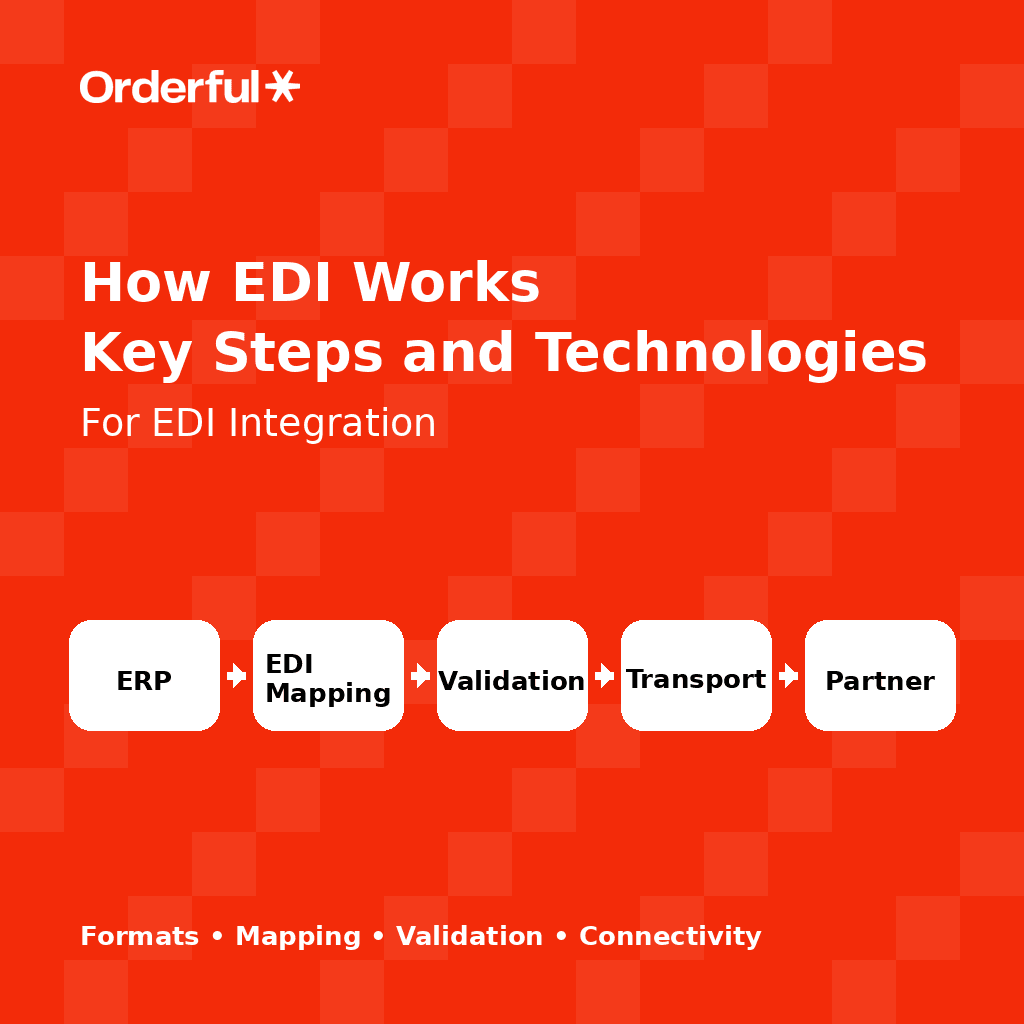
Learn how EDI works from document creation to final processing. Explore key steps, protocols, and tools that help automate and streamline EDI workflows.
Many companies know they need electronic data interchange (EDI) to work with retailers and logistics partners, but they aren’t always clear on how the process actually works. For teams , the steps behind exchanging structured business documents often feel abstract and more complex than expected.
Gaining a high-level view of helps teams plan integrations, reduce errors, and understand what happens as documents move between systems. This guide breaks down how EDI works from document creation to delivery so you can see what’s happening at each step.
About Orderful
If you're looking to simplify complex EDI workflows, Orderful delivers a cloud-native platform that automates mapping, translation, transmission, and validation through a single unified environment. Instead of maintaining separate custom integrations for each trading partner, the platform provides prebuilt connectors for common ERPs like NetSuite and QuickBooks, handles all EDI standards and communication protocols (AS2, SFTP, HTTPS, VAN) in one place, and uses real-time validation to catch errors before transmission. Built-in monitoring provides complete transaction visibility, while AI-powered mapping suggestions accelerate partner onboarding from months to days. The platform scales effortlessly as your network grows, supporting both real-time API connectivity and batch processing without custom development. You can explore how the platform works and review our pricing to see how simple it is to replace manual EDI processes with automated workflows.
The EDI Transaction Lifecycle: How EDI Works from Start to Finish
As EDI runs behind the scenes, each transaction follows a predictable path from creation to delivery. Seeing that flow step-by-step helps clarify how two businesses exchange documents. Most EDI transactions follow these steps:
Step 1: Preparing Business Data
The workflow begins inside your internal systems. A WMS or ERP system generates a business document, such as a purchase order or invoice. EDI software extracts the needed data elements, organizes them into the standardized formats, and prepares them for translation.
Step 2: EDI Mapping and Translation
Once the data is gathered, it must be converted into the appropriate EDI standard. This is handled through mapping, where each internal field is paired with the required EDI segment. During translation, the system converts your source data into a structured file that meets partner specifications. At this step, the EDI translation process ensures accuracy and consistency.
Step 3: Transmitting the EDI Document
After translation, the file is ready to send. The system transmits documents using secure protocols such as AS2, SFTP, HTTPS, or a value-added network (VAN). These methods protect sensitive information and help ensure the file reaches the correct destination.
Step 4: Receipt, Validation, and Acknowledgment
After receiving the file, the trading partner’s system validates it against their rules. If everything checks out, the document moves into processing. An acknowledgment may be returned after delivery to confirm that the document passed basic checks before further processing.
Step 5: Reverse Translation and System Integration
After validation, the partner’s EDI system converts the file back into a format their internal applications can use. The data flows into their internal systems to support tasks such as inventory updates or billing workflows.
Example: A Purchase Order’s Journey (EDI 850):
A buyer creates a purchase order in their ERP, which becomes an EDI 850 purchase order. The file goes to the supplier, is validated, and is translated back into the supplier’s format. Their system uses the data to plan fulfillment and generate follow-up documents such as an EDI 856 advance ship notice or EDI 810 invoice.
What EDI Mapping and Translation Really Mean
Mapping is one of the most important parts of any EDI implementation, and it often creates the most confusion for new teams. At its core, mapping pairs each field in your internal systems with the correct element in the appropriate EDI format. For example, a “Ship-To Postal Code” field in your ERP must map to the right data element in the partner’s specification so the receiving system knows exactly where it belongs.
Why EDI Mapping is Essential
Because each trading partner has its own rules, every relationship requires its own map. These requirements appear in message implementation guidelines (MIGs), which outline segments, data types, validation rules, and required fields. Even when two partners use the same standard, such as ANSI X12 or EDIFACT, their variations often require unique maps.
EDI Translation
Translation happens once the mapping is in place. Your system converts internal data into the structured file your partner expects. EDI mapping and translation work together to ensure accuracy and reduce rejections. For many businesses, managing versions, specialized mapping, and shifting requirements makes this one of the most resource-intensive parts of electronic document data exchange.
EDI Connection Methods and Communication Protocols
Once a file is translated into the required EDI format, it must be transmitted securely to the trading partner. Industries and retailers use different communication methods, but they all ensure the document reaches the right destination safely.
Point-to-Point Methods
Many companies exchange documents directly with partners using point-to-point connections. Common options include AS2, SFTP, and HTTPS, each of which lets businesses send files securely without a third-party intermediary. These methods encrypt data during transmission and create a reliable pathway for sending and receiving EDI documents.
Value-Added Networks (VANs)
A value-added network, or VAN, acts as a managed communication layer between trading partners. Instead of sending files directly, companies send EDI documents to the VAN, which routes them to the correct destination. VANs help manage mailboxes, queuing, and delivery confirmations, though they may introduce additional costs depending on usage.
API and Cloud-Based Connectivity
Modern EDI platforms increasingly rely on APIs to move data between systems. API-based connections support real-time communication, reduce the need to maintain multiple protocols, and integrate more easily with internal applications. While traditional methods like the secure file transfer protocol (SFTP) remain widely used, many organizations prefer cloud-based models for greater flexibility and faster onboarding.
Choosing the right transmission method depends on trading partner requirements, internal capabilities, and long-term scalability goals.
How EDI Integrates with ERP and Other Internal Systems
Once an EDI document is received and validated, its data must flow into internal systems so teams can act on it. This final step is where EDI delivers real operational value, enabling companies to update inventory, fulfill orders, generate invoices, and keep information consistent across departments.
Where EDI Data Lands in ERP and WMS Systems
Most EDI workflows begin and end with core business applications such as an ERP or warehouse management system. When an inbound EDI document arrives, the system matches its data to internal records, such as purchase orders or customer accounts. This creates a unified view of information across teams.
Real-Time vs. Batch Processing
EDI data may flow in real time or through scheduled batch updates. Batch workflows may be sufficient for processing large volumes of documents at set intervals, while real-time integration helps teams respond quickly to new orders or inventory adjustments.
Error and Exception Handling
Missing data, incorrect codes, or mismatched records can cause errors that need attention before the document can be processed. Strong exception handling gives teams visibility into root issues and allows them to correct problems quickly — preventing delays, shipment errors, or misalignment between systems.
EDI Workflow Automation
As companies grow, manual data entry and one-off processes become difficult to maintain. EDI workflow automation helps reduce this burden by routing documents, applying validation rules, and updating systems without human intervention. Automated processes reduce the risk of errors and help teams focus on higher-value tasks rather than repetitive data entry.
Why EDI Can Be Complicated Without the Right Tools
Even with clear standards and defined workflows, companies often find that EDI becomes more complicated as their partner network grows. Each trading partner has its own requirements, and even small differences can lead to rejected documents. Without the right tools in place, these issues can slow down operations and create manual work for internal teams.
Maintaining different maps for common EDI documents across several business partners is labor-intensive and time-consuming. Partner compliance requirements can change, and companies must keep up with revised criteria. Testing and certification tend to add even more overhead. These challenges can limit operational efficiency and make it difficult for teams to scale their EDI workflows confidently.
How Orderful Streamlines the Entire EDI Workflow
Modern EDI solutions make behind-the-scenes heavy lifting easier. Orderful centralizes EDI workflows into a single cloud-based environment, reducing manual work and speeding up partner onboarding.
Here’s how Orderful simplifies the process:
Prebuilt connectors: Orderful connects to common business applications like NetSuite ERP or QuickBooks, so you can move data between systems without maintaining custom integrations.
Unified platform: The platform manages mapping, translation, routing, and delivery in one place, reducing the need to switch between tools or maintain separate environments for different partners.
Real-time visibility: Built-in monitoring tools help you track document status, understand failures, and see whether partners received or acknowledged your transactions, reducing uncertainty in day-to-day operations.
Automated validation: Orderful automatically checks each document against partner requirements so errors are identified before the file is sent, helping you avoid rejections and downstream delays.
Scales as partner network grows: Whether you're adding a single retailer or expanding into new markets, Orderful makes it easier to onboard partners quickly and adapt to new requirements as they change.
Modern EDI features create a more predictable, automated, and scalable EDI experience, making it easier for teams to stay compliant and keep their operations running smoothly.
Move Toward Operational Efficiency With Automated EDI
Understanding how EDI works behind the scenes makes it easier to identify where automation creates the most value. Modern EDI integration platforms like Orderful let you replace manual checks and streamline document exchange. Whether you're improving existing workflows or planning your first integration, clarity on the EDI process helps you choose the right tools for your business needs.
For a more predictable, automated way to manage EDI, platforms like Orderful streamline each step of the workflow, so your team can focus on operations rather than troubleshooting. Schedule a demo today or speak to an EDI expert to learn how Orderful automates the entire EDI workflow with confidence.
FAQs:How EDI Works
How does EDI work step by step?
EDI works through a five-step transaction lifecycle that moves business documents between trading partners automatically. First, your ERP or WMS system generates a business document like a purchase order, and EDI software extracts the needed data elements. Second, EDI mapping pairs each internal field with the required EDI segment, and translation converts your data into a structured file meeting partner specifications (like ANSI X12 or EDIFACT). Third, the system transmits the document using secure protocols such as AS2, SFTP, HTTPS, or VAN to protect sensitive information during transfer. Fourth, the trading partner's system receives and validates the file against their rules, returning an acknowledgment if the document passes validation checks. Fifth, the partner's EDI system converts the file back into their internal format through reverse translation, and the data flows into their business applications to trigger fulfillment, inventory updates, or billing workflows.
What is EDI mapping and translation?
EDI mapping pairs each field in your internal systems with the correct element in the required EDI format so receiving systems know exactly where data belongs. For example, a "Ship-To Postal Code" field in your ERP must map to the right data element in the partner's specification. Every trading partner requires its own map based on their message implementation guidelines (MIGs), which outline segments, data types, validation rules, and required fields. Even when two partners use the same standard like ANSI X12 or EDIFACT, their variations often require unique maps. EDI translation happens after mapping is complete, converting your internal data into the structured file your partner expects. Mapping and translation work together to ensure accuracy and reduce document rejections. Managing different maps for multiple partners across common EDI documents becomes resource-intensive as networks grow, making this one of the most complex parts of EDI implementation.
What communication protocols does EDI use?
EDI uses several secure communication protocols to transmit documents between trading partners. Point-to-point methods include AS2 (encrypted protocol widely used in retail and manufacturing), SFTP (Secure File Transfer Protocol for encrypted file-based transfers), and HTTPS (secure web-based transmission). These methods let businesses send files directly without third-party intermediaries. Value-added networks (VANs) act as managed communication layers that route EDI documents between partners, handling mailboxes, queuing, and delivery confirmations, though they add costs based on usage. Modern EDI platforms increasingly use API-based connections that support real-time communication, reduce the need to maintain multiple protocols, and integrate more easily with internal applications. Cloud-based connectivity provides greater flexibility and faster partner onboarding compared to legacy point-to-point or VAN approaches. Choosing the right transmission method depends on trading partner requirements, internal technical capabilities, and long-term scalability goals.
How does EDI integrate with ERP and WMS systems?
EDI integrates with ERP and warehouse management systems to automatically flow document data into internal business applications where teams can act on it. When an inbound EDI document arrives after validation, the system matches its data to internal records like purchase orders or customer accounts, creating a unified view across departments. Integration can happen through real-time API connections that update systems immediately when documents arrive, or through scheduled batch processing that handles large volumes at set intervals. Prebuilt EDI connectors for common ERPs like NetSuite, SAP, Microsoft Dynamics, and QuickBooks eliminate custom integration development. Strong exception handling provides visibility when missing data, incorrect codes, or mismatched records cause errors, allowing teams to correct problems before they cause shipment delays or system misalignment. EDI workflow automation routes documents, applies validation rules, and updates systems without human intervention, reducing manual data entry and operational errors.
Why is EDI complicated without modern tools?
EDI becomes complicated without modern tools because each trading partner has unique requirements that create manual overhead. Maintaining different maps for common EDI documents across multiple partners is labor-intensive and time-consuming. Partner compliance requirements change frequently, forcing teams to update maps and retest connections. Testing and certification processes add significant overhead when onboarding new partners. Point-to-point connections multiply as networks grow, each requiring separate protocol configurations and maintenance. Manual validation processes can't catch errors before transmission, leading to rejected documents and troubleshooting cycles. Lack of real-time visibility makes it difficult to track document status or identify why transactions failed. Legacy systems often require custom code for each integration, creating technical debt that limits scalability. These challenges slow operations, increase costs, and make it difficult to add partners quickly. Modern EDI platforms eliminate this complexity through automated mapping, unified protocol management, real-time validation, and prebuilt integrations.
What are message implementation guidelines (MIGs)?
Message implementation guidelines (MIGs) are detailed specifications that define exactly how EDI documents should be structured for a specific trading partner. Even when partners use the same EDI standard like ANSI X12 or EDIFACT, each creates their own MIG outlining which segments are required versus optional, what data types and formats are accepted for each field, validation rules that must be met for successful processing, and specific codes or identifiers they use. For example, Walmart's MIG for an EDI 850 purchase order differs from Target's MIG for the same document type. Trading partners publish MIGs so suppliers know precisely how to format documents for their systems. EDI mapping uses MIGs as the blueprint for converting internal data into partner-compliant formats. Managing multiple MIGs across a growing partner network creates significant complexity, which is why modern EDI platforms automate mapping based on stored MIG configurations.
How does Orderful simplify EDI workflows?
Orderful simplifies EDI workflows by centralizing mapping, translation, transmission, and validation into a single cloud-based platform that eliminates manual processes and custom integrations. The platform provides prebuilt connectors for common business applications like NetSuite ERP and QuickBooks that automatically move data between systems without maintaining point-to-point integrations. Unified protocol support handles AS2, SFTP, HTTPS, and VAN connections through one environment, removing the complexity of managing separate transmission methods. Real-time validation automatically checks each document against partner requirements before sending, catching errors that cause rejections and delays. Built-in monitoring provides complete transaction visibility including delivery status, partner acknowledgments, and failure diagnostics. AI-powered mapping suggestions accelerate partner onboarding by recommending field configurations based on MIG requirements and historical data. The platform scales effortlessly as partner networks grow, supporting both real-time API workflows and batch processing without requiring additional custom development. This automation reduces operational overhead, speeds partner onboarding from months to days, and helps teams maintain compliance without the resource intensity of legacy EDI systems.
- 01About Orderful
- 02The EDI Transaction Lifecycle: How EDI Works from Start to Finish
- 03What EDI Mapping and Translation Really Mean
- 04EDI Connection Methods and Communication Protocols
- 05How EDI Integrates with ERP and Other Internal Systems
- 06Why EDI Can Be Complicated Without the Right Tools
- 07How Orderful Streamlines the Entire EDI Workflow
- 08Move Toward Operational Efficiency With Automated EDI
- 09FAQs:How EDI Works
